Color Detection
Color Detection finds parts by colour, with no model to train. Every blob of a ticked colour larger than Min blob area is reported, with its centre and size.
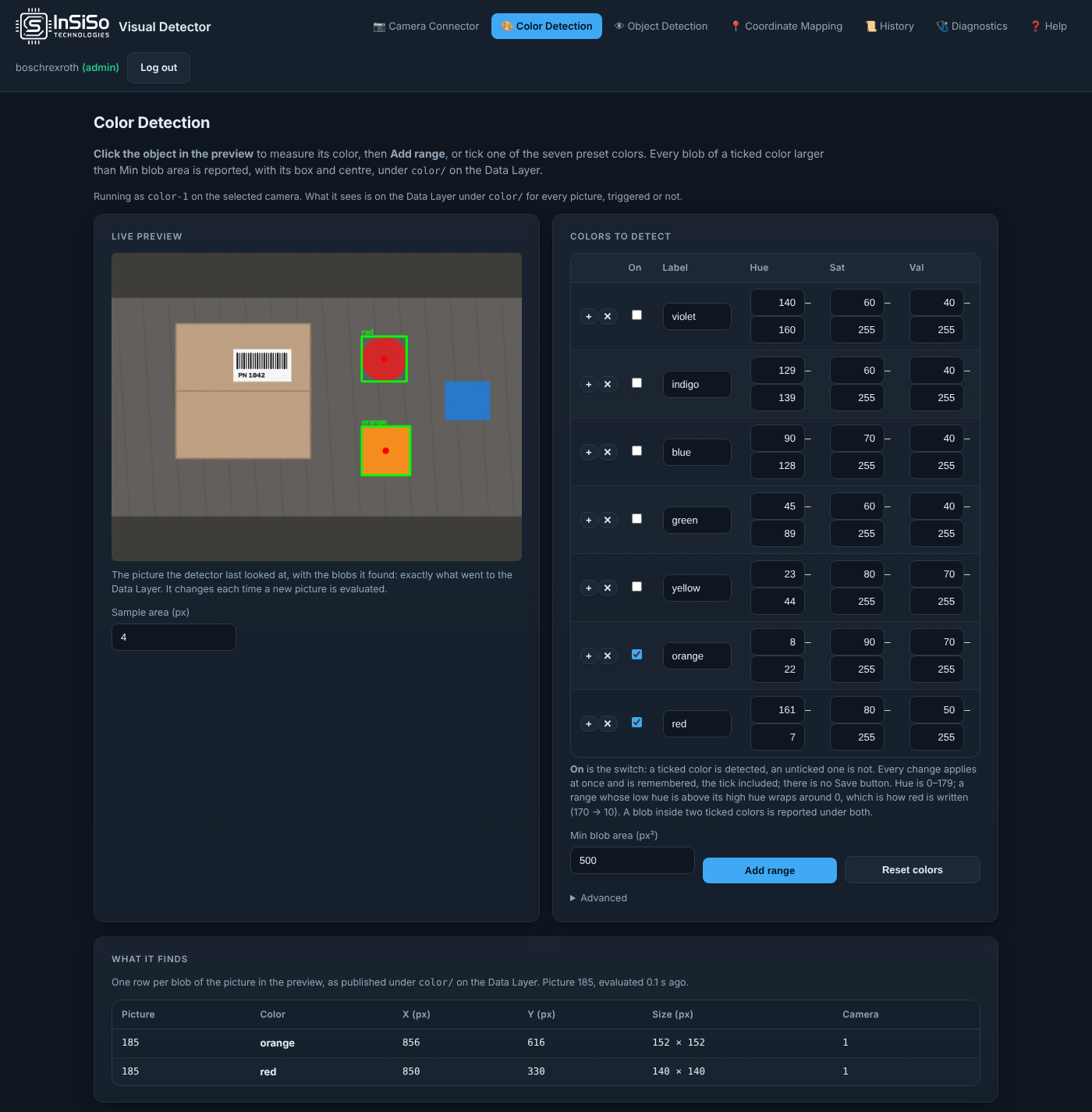
Set it up
- Connect a camera on Camera Connector. Its color detector,
color-<camera>, starts by itself. - Tick On for the colours to find. Seven preset colours are listed, all off: violet, indigo, blue, green, yellow, orange and red. Nothing is detected until a colour is ticked.
- Or click the part in Live preview to measure its colour, then press Add range. Sample area (px) is the size of the spot measured.
- Set Min blob area (px²). Smaller blobs are ignored. It applies to every colour.
Every change applies at once and is remembered. There is no Save button. Reset colors goes back to the seven presets, all off.
Colour ranges
Each colour is a range of Hue (0–179), Sat and Val (0–255). A range whose low hue is above its high hue wraps around 0: that is how red is written, for example 161 to 7.
To fine-tune a colour, click the part in Live preview, then press + on that colour's row: the range widens to include the sampled pixel. × deletes a range.
Every ticked colour is looked for on its own. A blob that fits two ticked colours is reported under both. The order of the list is only the order it is shown in.
Advanced holds Median blur (0 = off) and Max detections, the most blobs reported per picture.
What it shows
Live preview is the picture the detector last looked at, with the blobs it found: exactly what went to the Data Layer. The page runs no detection of its own.
What it finds lists one row per blob: the picture number, the colour, the centre (X (px), Y (px)), the size and the camera. The same values are on the Data Layer under color/.
Colour positions and sizes are in camera pixels. The picture is evaluated on a copy at most 1280 px wide, and the results are scaled back to the camera's pixels, to within about 2 px on a 2500 px camera.
Each camera has its own color detector and its own colours. A second camera's detector starts as a copy of the first one's.