Detection History
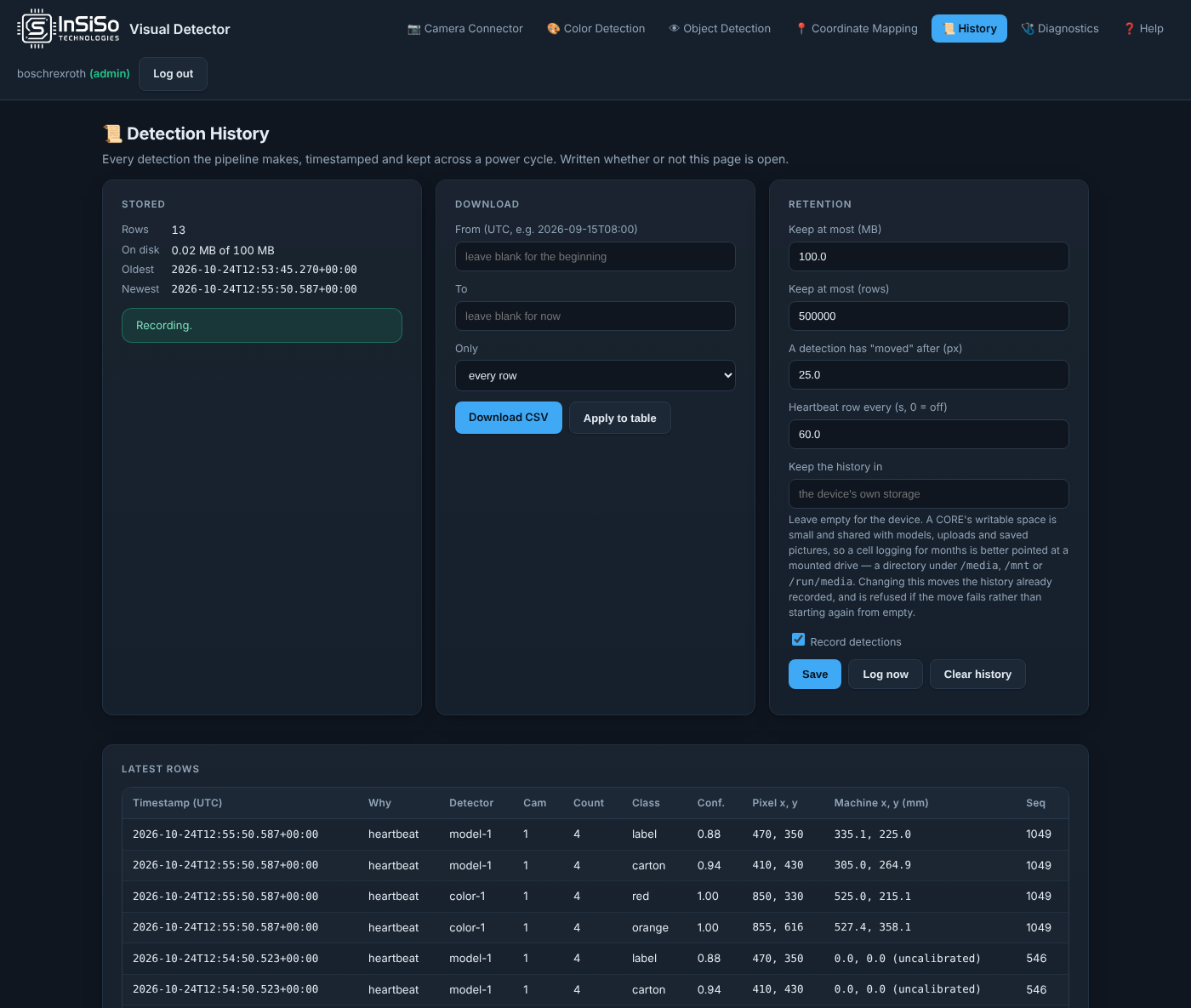
Detection History is a timestamped record of what the app detected. It is written whether or not the page is open, and kept across power cycles. The Data Layer holds the latest values; the history is the series behind them.
What is recorded
A row is written when something happened, not for every picture:
- the class, the count or the position changed (A detection has "moved" after (px) sets how far counts as a move);
- a trigger was evaluated;
- a heartbeat interval passed with nothing going on (Heartbeat row every (s, 0 = off)).
Each row has the time (UTC), why it was written, the detector, camera, count, class, confidence, pixel position and machine position.
Record detections switches recording on and off. Log now writes a row at once.
Download
- Under Download, enter From and To in UTC, or leave them blank for everything.
- Choose Only: every row, changes, triggers or heartbeats.
- Press Download CSV. Apply to table shows the same selection under Latest rows.
Retention
The history is capped so it cannot fill the device: Keep at most (MB) and Keep at most (rows). The oldest rows go first.
Keep the history in is where the history is kept. Leave it empty for the device's own storage. A ctrlX CORE has little writable space, so for months of logging point it at a USB drive: a directory under /media, /mnt or /run/media. Changing it moves the existing history with it.
Press Save after changing the retention settings. Clear history deletes every row and cannot be undone: download the CSV first.